Managing remote desktops efficiently has become an important requirement for businesses, IT teams, developers, and organizations with distributed workforces. As more applications and business processes move to remote environments, companies need reliable infrastructure that allows users to access Windows desktops and applications from different locations. A combination of Windows VPS hosting and Remote Desktop Services can provide a practical foundation for this type of environment. However, organizations also need to understand licensing requirements, including Windows VPS RDS CAL, when planning a remote desktop setup.
Understanding Windows VPS RDS CAL
Windows VPS RDS CAL refers to a Remote Desktop Services Client Access License used with Windows Server environments that provide remote desktop functionality. A VPS, or Virtual Private Server, gives users a dedicated virtualized computing environment hosted on a physical server. Windows VPS solutions can be configured to support business applications, administrative tools, development environments, and remote desktop access.
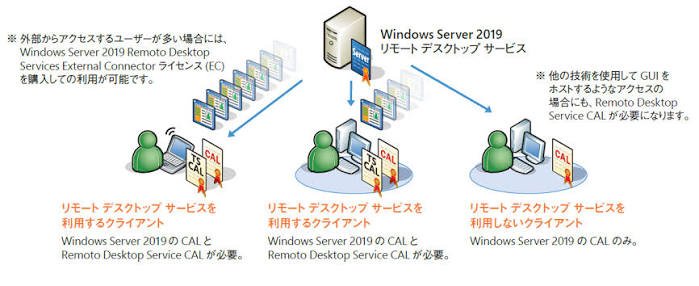
Remote Desktop Services, commonly known as RDS, allows authorized users or devices to connect to a Windows Server remotely. An RDS CAL provides the necessary licensing permission for accessing RDS functionality according to the applicable Microsoft licensing model.
When organizations plan their infrastructure, understanding how Windows VPS RDS CAL requirements fit into their deployment can help them avoid licensing misunderstandings and create a more organized remote access environment.
Why Flexible Desktop Management Matters
Traditional desktop management can become complicated when employees work from multiple offices, locations, or home environments. Physical computers require individual maintenance, software installations, updates, security configurations, and hardware management.
A centralized Windows VPS environment can simplify many of these tasks. Instead of relying entirely on individual physical computers, administrators can maintain applications and desktop environments on centralized servers. Users can then connect remotely using supported devices.
This approach can provide greater flexibility for organizations that need consistent access to business applications. Administrators can manage the server environment centrally while users access the resources they need remotely.
Centralized Administration
One of the major advantages of a remote Windows desktop environment is centralized administration. IT administrators can manage applications, user accounts, security policies, storage, and system configurations from a central location.
With an appropriately configured Windows VPS, administrators can maintain a standardized environment for authorized users. Software updates can be planned centrally, and administrators can monitor system performance without physically visiting every user’s workstation.
This can be particularly useful for businesses with remote employees or teams working across different geographical locations. Centralized management reduces the need to maintain separate configurations on numerous physical computers.
Supporting Remote Employees
Remote work has increased the need for secure and dependable desktop access. Employees may need to access business applications, internal files, databases, and other resources while working away from the office.
A Windows-based VPS can provide a consistent desktop environment that users can access remotely. Instead of installing every application on a personal computer, organizations can host required applications within a controlled server environment.
Windows VPS RDS CAL licensing should be considered as part of this planning process. Organizations should determine whether their intended user or device access requires RDS CALs and ensure that licensing is obtained and configured appropriately.
Improving Resource Management
A centralized VPS environment can also make computing resources easier to manage. Administrators can allocate processing power, memory, storage, and network resources according to the requirements of the hosted workloads.
For example, a business application that requires a Windows environment can be hosted on a VPS instead of being installed on numerous individual machines. Users can connect to the environment when they need access.
Resource planning remains important, however. If many users connect simultaneously, the server needs sufficient CPU, RAM, storage performance, and network capacity to maintain an acceptable experience.
Security and Access Controls
Security should be an essential part of every remote desktop deployment. Remote access creates additional entry points into an organization’s computing environment, so administrators need to implement appropriate controls.
Strong passwords, multi-factor authentication where supported, user permissions, firewall rules, regular updates, and restricted remote access can all contribute to a more secure environment.
Administrators should also follow the principle of least privilege. Users should receive only the permissions required to perform their responsibilities. Separating administrative accounts from standard user accounts can provide another layer of protection.
Licensing is also an important component of responsible deployment. Windows VPS RDS CAL arrangements should be reviewed alongside the organization’s technical and security requirements rather than treated as a separate afterthought.
Choosing the Right VPS Resources
The performance of a remote desktop environment depends heavily on the VPS configuration. A small environment with a few users may have different requirements from an organization supporting dozens of simultaneous connections.
CPU resources affect application processing, while RAM is particularly important when several applications or user sessions are active at the same time. Storage performance can influence application loading and file operations.
Network quality is equally important because remote desktop sessions depend on stable connectivity. A VPS provider with reliable infrastructure and suitable network performance can help create a smoother user experience.
Before selecting a configuration, organizations should estimate the number of users, applications, simultaneous sessions, storage requirements, and expected workloads.
Managing Software and Updates
Centralized desktop management can simplify software maintenance. Instead of updating applications individually across many computers, administrators can maintain applications within the centralized Windows environment.
Regular operating system updates are essential for maintaining security and compatibility. Administrators should establish a consistent patching process and test important updates when necessary before deploying them broadly.
Backups should also be considered. Important business information stored within the VPS environment should have an appropriate backup strategy. Backups can help organizations recover from accidental deletion, system failures, or other unexpected incidents.
Scalability for Growing Organizations
Another advantage of VPS-based desktop management is the ability to adapt infrastructure as requirements change. A growing organization may need additional resources, users, or applications over time.
Administrators can review resource utilization and determine whether additional CPU, RAM, storage, or server capacity is required. In some environments, workloads can also be distributed across multiple servers.
Planning for Windows VPS RDS CAL requirements should form part of this scalability strategy. As the number of users or devices changes, licensing requirements may also need to be reviewed.
Cost and Operational Considerations
Remote desktop infrastructure can affect both technology and operational costs. Organizations need to consider VPS hosting, Windows licensing, RDS licensing, storage, backups, security tools, administration, and technical support.
A centralized approach may reduce some hardware management responsibilities, but it does not eliminate the need for careful budgeting. Businesses should calculate expected usage and compare infrastructure costs with their operational requirements.
The goal should be to create a balanced environment that provides the required performance, accessibility, security, and licensing compliance without paying for unnecessary resources.
Best Practices for Flexible Desktop Management
Organizations implementing a Windows remote desktop environment can benefit from several best practices. Start by identifying the number of users and applications that need remote access. Select VPS resources based on actual workloads rather than relying on assumptions.
Next, establish appropriate user permissions and security controls. Keep operating systems and applications updated, maintain reliable backups, and monitor resource usage regularly.
It is also important to maintain accurate licensing records. Windows VPS RDS CAL requirements should be reviewed against the specific deployment and Microsoft’s current licensing terms. Because licensing rules can vary according to the environment and licensing agreement, organizations should verify their requirements through appropriate Microsoft licensing resources or a qualified licensing professional.
Conclusion
Windows VPS infrastructure can provide a flexible foundation for organizations that need centralized desktop access and remote application management. When combined with Remote Desktop Services, it can support employees and teams who need consistent access to Windows-based resources from different locations.
However, successful implementation involves more than simply deploying a VPS. Performance planning, security, backups, user management, software maintenance, and licensing all play important roles. Understanding Windows VPS RDS CAL requirements can help organizations plan their remote desktop environment responsibly while maintaining the flexibility needed for modern work.
With careful planning and ongoing administration, a Windows-based VPS environment can become a practical component of centralized desktop management, providing users with convenient remote access while giving administrators greater control over the underlying infrastructure.