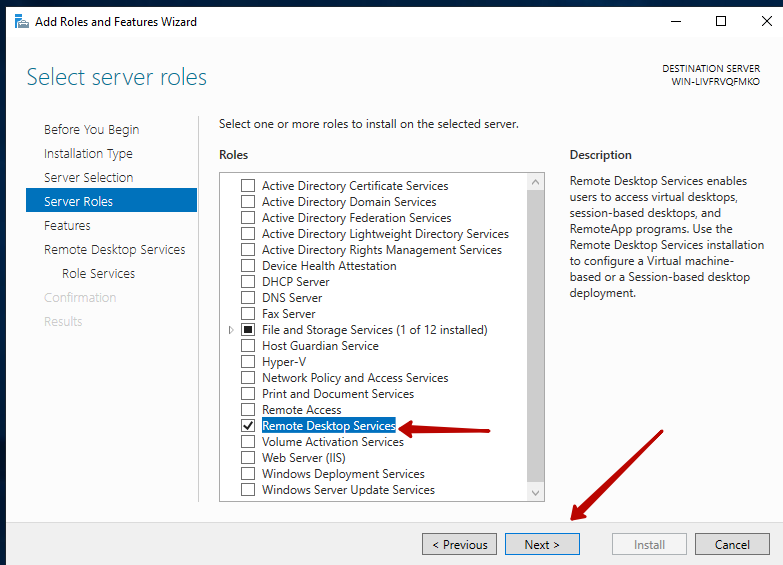
Remote desktop technology has become an important part of modern business computing. Organizations use remote servers to provide employees, contractors, and administrators with access to applications, files, and business systems from different locations. A Windows-based virtual private server, commonly known as a Windows VPS, can provide a flexible environment for these tasks. However, when multiple users need to access Windows Server through Remote Desktop Services, licensing becomes an important consideration. This is where the concept of a windows vps rds cal becomes relevant.
Understanding Remote Desktop Services Client Access Licenses, or RDS CALs, helps organizations build remote desktop environments that are properly licensed, manageable, and suitable for their operational requirements.
Understanding Windows VPS and Remote Desktop Services
A Windows VPS is a virtualized server that runs a Windows Server operating system within a shared physical infrastructure. It provides dedicated virtual resources such as processing power, memory, storage, and network access. Businesses often use Windows VPS hosting for applications, development environments, databases, websites, administration, and remote work.
Remote Desktop Services allows authorized users to connect to a Windows Server remotely. Instead of requiring employees to work directly from the physical location where a server is installed, RDS enables them to interact with a remote Windows environment through a network connection.
This setup can be particularly useful for distributed teams. Employees can access the same applications and resources without installing every business application on their individual computers. Nevertheless, remote access introduces licensing requirements that organizations should understand before deploying a multi-user environment.
What Is an RDS CAL?
An RDS CAL is a license that grants a user or device the right to access certain Remote Desktop Services functionality on a Windows Server. It is different from the Windows Server license itself.
The distinction is important because purchasing or renting a Windows VPS does not automatically mean that unlimited Remote Desktop Services access is licensed for every possible user. Windows Server licensing and Remote Desktop Services licensing address different rights.
There are generally two major types of RDS CALs: User CALs and Device CALs. A User CAL is associated with an individual user who needs remote access, while a Device CAL is associated with a device used to access the remote environment. The appropriate model depends on how an organization structures its workforce and devices.
Why Windows VPS RDS CAL Matters
The importance of a windows vps rds cal comes down to compliance, scalability, administration, and predictable operation. When an organization allows multiple people to connect to a Windows VPS through Remote Desktop Services, it needs to consider whether the necessary licenses are available.
Licensing should not be treated as an afterthought. A remote desktop environment can become difficult to manage when access grows without a clear licensing strategy. By determining licensing requirements early, businesses can better understand the total cost and structure of their remote computing environment.
Proper licensing can also make internal administration easier. IT teams can maintain clearer records of users, devices, and access rights instead of relying on informal arrangements.
User CALs and Device CALs
Choosing between User CALs and Device CALs requires understanding how remote access is actually used.
User CALs can be useful when employees access the Windows VPS from several devices. For example, an employee might use a desktop computer at the office, a laptop while traveling, and another authorized device from home. A user-based licensing model can be practical when the same individuals require access from multiple endpoints.
Device CALs may make more sense when several employees share a limited number of workstations. In that situation, licensing the devices rather than individual users may better match the organization’s usage pattern.
The right choice depends on the environment, licensing terms, and Microsoft’s applicable requirements. Organizations should evaluate their specific scenario rather than assuming that one model is always cheaper or better.
Compliance Is a Major Consideration
One of the strongest reasons to understand windows vps rds cal requirements is compliance. Software licensing establishes legal rights to use specific functionality. Ignoring licensing requirements can create unnecessary business and financial risks.
Organizations should therefore determine what Windows Server edition they are using, how Remote Desktop Services is deployed, how many users or devices require access, and what licensing model applies.
Businesses should also be careful when purchasing services from VPS providers. A provider may advertise Windows VPS hosting, but customers should not automatically assume that the advertised server price includes every possible Remote Desktop Services license. Reviewing the provider’s licensing information and Microsoft’s current licensing documentation can help avoid misunderstandings.
Supporting Remote Work
Remote desktop environments are increasingly useful for hybrid and distributed workplaces. Employees can connect to centralized applications and data without requiring all resources to reside on their local computers.
A properly planned windows vps rds cal strategy supports this model by helping organizations determine who is permitted to access the remote environment. It can also contribute to better administrative control because access can be organized around defined users or devices.
Centralized computing can simplify application maintenance as well. Instead of updating software individually across numerous computers, administrators may be able to maintain applications within the remote server environment.
Security and Access Management
Licensing alone does not make a remote desktop environment secure. Organizations should combine appropriate licensing with strong security practices.
Remote Desktop Services should be protected using strong authentication, limited permissions, updated operating systems, firewall policies, and appropriate network controls. Multi-factor authentication can provide another layer of protection where supported by the organization’s architecture.
Administrators should also follow the principle of least privilege. Users should receive only the access they need to perform their responsibilities. Regularly reviewing accounts can help identify unused or unnecessary access.
These security measures become especially important when a Windows VPS is accessible over the internet.
Planning for Growth
A small business may begin with only a few remote users, but its requirements can change quickly. New employees, contractors, departments, or locations may increase the number of people who need access.
Planning the windows vps rds cal requirements alongside expected growth helps organizations avoid making rushed licensing decisions later. IT teams can estimate the number of users or devices, identify the applications they need, and determine whether the existing VPS has sufficient resources.
Licensing and server capacity should be considered separately. Having sufficient RDS CALs does not guarantee that a VPS has enough CPU, memory, storage, or bandwidth to provide a good experience for every connected user.
Choosing a VPS Provider Carefully
When selecting a Windows VPS provider, customers should examine more than advertised RAM, CPU, and storage. Licensing terms are equally important for organizations planning to use Remote Desktop Services.
A reliable provider should clearly explain what Windows licensing is included, what additional licensing customers are responsible for, and whether the environment supports the intended RDS configuration.
Customers should also review backup policies, network reliability, server management options, security features, and support availability. A low monthly price may not represent good value if important licensing or infrastructure requirements are unclear.
Common Mistakes to Avoid
One common mistake is assuming that a Windows VPS automatically provides unlimited multi-user Remote Desktop access. Another is confusing a Windows Server license with an RDS CAL.
Organizations may also fail to account for how users access the environment. A business with employees using several devices should evaluate whether User CALs are more appropriate, while organizations with shared workstations may need to examine Device CALs.
Another mistake is relying exclusively on information from third-party sellers without verifying licensing details. Microsoft licensing rules can be complex and can change over time, so current official documentation and qualified licensing advice should be consulted for specific deployments.
Conclusion
A windows vps rds cal is an important consideration for organizations using Windows VPS infrastructure for multi-user remote desktop environments. RDS CALs address access rights for Remote Desktop Services, while the Windows Server license covers the underlying server operating system and its associated rights.
Understanding the difference helps businesses plan more effectively, maintain licensing compliance, control remote access, and prepare for future growth. Whether an organization has a small remote team or a larger distributed workforce, licensing should be considered alongside server resources, security, user management, and provider terms.
A thoughtful approach to RDS licensing can make a Windows VPS environment easier to manage and better aligned with an organization’s technical and operational needs.