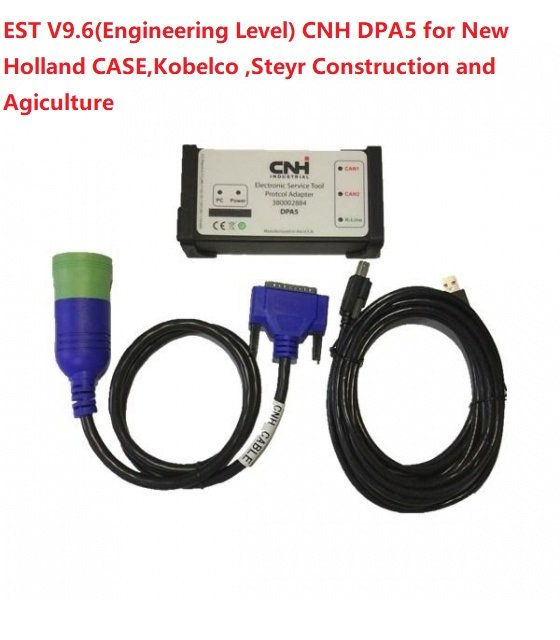
Understanding whether the CNH DPA5 diagnostic interface is compatible with your equipment is essential before making any investment in vehicle diagnostics. Many technicians, fleet managers, and agricultural equipment owners rely on the CNH DPA5 for advanced diagnostics, but compatibility depends on several technical and operational factors. This guide explains how the CNH DPA5 works, what systems it supports, and how to determine if it will function with your machinery.
Understanding What CNH DPA5 Is
The CNH DPA5 is a professional-grade diagnostic adapter used primarily for CNH Industrial equipment, including brands like Case IH, New Holland, and other agricultural and construction machinery under the CNH umbrella. It acts as a communication bridge between your computer and the vehicle’s electronic control modules (ECMs).
The CNH DPA5 supports modern diagnostic protocols and is designed to work with advanced software platforms used for reading fault codes, performing calibrations, and running system tests. It replaces older interfaces like DPA3 and DPA4, offering faster communication and broader protocol coverage.
Because the CNH DPA5 is designed with updated hardware and firmware, it supports CAN, ISO, and other communication standards commonly found in modern machinery. However, compatibility is not universal, which is why understanding your equipment is crucial.
Equipment Compatibility Basics for CNH DPA5
To determine if the CNH DPA5 will work with your machine, you need to consider three major factors:
First, the brand and model of your equipment. The CNH DPA5 is optimized for CNH Industrial machines, so it works best with Case IH tractors, New Holland combines, and similar equipment.
Second, the diagnostic protocol your equipment uses. If your machinery supports CAN-based communication systems or CNH-specific diagnostic networks, compatibility is highly likely.
Third, the software being used with the CNH DPA5. Tools like CNH EST (Electronic Service Tool) are often required to unlock full functionality.
If your equipment falls outside CNH Industrial’s ecosystem, the CNH DPA5 may still function in limited diagnostic capacity, but full features might not be available.
How to Check If CNH DPA5 Works With Your Machine
Before purchasing or using the CNH DPA5, it is important to verify compatibility using a structured approach.
Start by checking your equipment’s service manual. Manufacturers typically list supported diagnostic tools and communication standards. If CNH DPA5 or compatible protocols are mentioned, you are likely safe.
Next, identify your machine’s diagnostic port. Most modern equipment uses a standard 9-pin or 6-pin connector. The CNH DPA5 typically supports these configurations with appropriate cables.
Finally, confirm software requirements. Even if the hardware connects physically, the CNH DPA5 requires proper software to communicate with your machine’s control modules. Without it, the device will not function properly.
Key Features That Affect CNH DPA5 Compatibility
Several features of the CNH DPA5 directly influence whether it will work with your equipment.
One important feature is multi-protocol support. The CNH DPA5 can communicate using different diagnostic languages, which increases its compatibility range across CNH machinery.
Another feature is firmware update capability. Regular updates ensure the CNH DPA5 stays compatible with newer machines released by CNH Industrial. Without updated firmware, compatibility with newer equipment may be limited.
Speed and data handling also matter. The CNH DPA5 offers faster data transfer compared to older diagnostic tools, making it suitable for complex systems with multiple ECUs.
Lastly, power and connectivity options influence usability. The CNH DPA5 can connect via USB or wireless modules depending on configuration, which may affect compatibility with older systems or laptops.
Common Compatibility Scenarios for CNH DPA5
In real-world use, the CNH DPA5 is commonly compatible with several categories of equipment:
Modern CNH tractors and combines usually offer full compatibility, especially those manufactured in the last decade. These machines are designed with diagnostic systems that align with CNH DPA5 capabilities.
Construction equipment such as backhoes and loaders from CNH brands often support partial to full compatibility, depending on model year and onboard electronics.
Older machinery may present challenges. If the equipment predates modern CAN-based systems, the CNH DPA5 might not communicate effectively or may require adapters and legacy software support.
Non-CNH equipment is generally not fully compatible. While some basic diagnostic reading may be possible, advanced functions like recalibration or module programming are usually restricted.
Software Requirements for CNH DPA5 Compatibility
Even if your hardware is compatible, software plays a critical role in determining whether the CNH DPA5 will function correctly.
The most common software used with CNH DPA5 is CNH Electronic Service Tool (EST). This software is specifically designed to communicate with CNH machinery and unlock full diagnostic capabilities.
Without the correct software version, the CNH DPA5 may fail to recognize your equipment or may only display limited fault codes. Software licensing also matters, as some functions are restricted to authorized users.
Additionally, operating system compatibility is important. Many diagnostic tools require Windows-based systems, and outdated operating systems may cause connection issues with the CNH DPA5.
Troubleshooting CNH DPA5 Compatibility Issues
If your CNH DPA5 is not working with your equipment, there are several troubleshooting steps you can take.
First, check physical connections. Ensure the diagnostic cable is securely connected to both the CNH DPA5 and the machine’s port.
Second, verify drivers and software installation. Missing or outdated drivers can prevent communication between your computer and the CNH DPA5.
Third, confirm that your equipment is powered and in diagnostic mode. Some machines require ignition-on or service mode for the CNH DPA5 to connect.
Finally, update firmware and software. Outdated versions are one of the most common reasons for compatibility issues with the CNH DPA5.
Final Verdict on CNH DPA5 Compatibility
The CNH DPA5 is a powerful and versatile diagnostic interface, but its compatibility depends heavily on your equipment type, model year, communication protocols, and software environment.
If you are working with modern CNH Industrial machinery, the CNH DPA5 is highly likely to be fully compatible and provide advanced diagnostic capabilities. However, for older or non-CNH equipment, compatibility may be limited or require additional tools.